Configuring Customer Information Screens
Most customer information screens on the POS application and PIN pad are already created by default with specific fields and values. Depending on the retailer needs, these screens may be customized with new or additional fields that require new or additional values. There are also specific features that may require the retailer to create a new customer information screen.
When configuring a customer information screen, follow these tasks.
- Configure the information fields.
- Configure the information form.
- Verify the POS application or PIN pad screen.
The following image shows how a customer information screen on the POS application relates to an information form and its respective information fields.
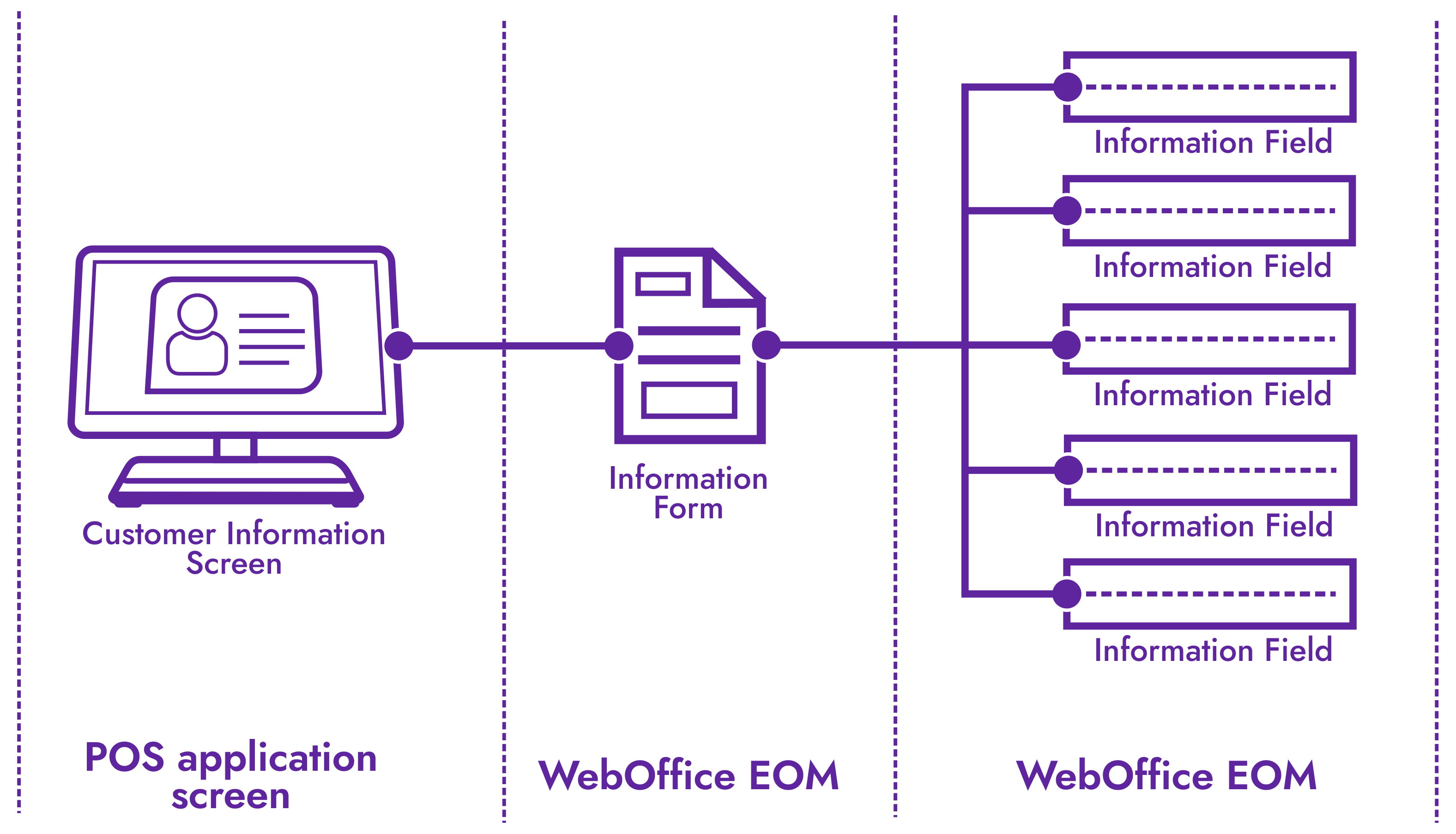
Customer information screen on the POS application
The following image shows an example of an existing customer information screen on the POS application. This screen can be configured to have additional fields.

Configuring the information form
This section describes the information form, the parameters, and the values for the Enroll Customer information screen that is displayed on the POS application.
In the WebOffice EOM application, the Enroll Customer information form can be configured using the following parameter record:
- Setup > Information Form Definitions > Info Set Name = EnrollCustomerInfoPrompts
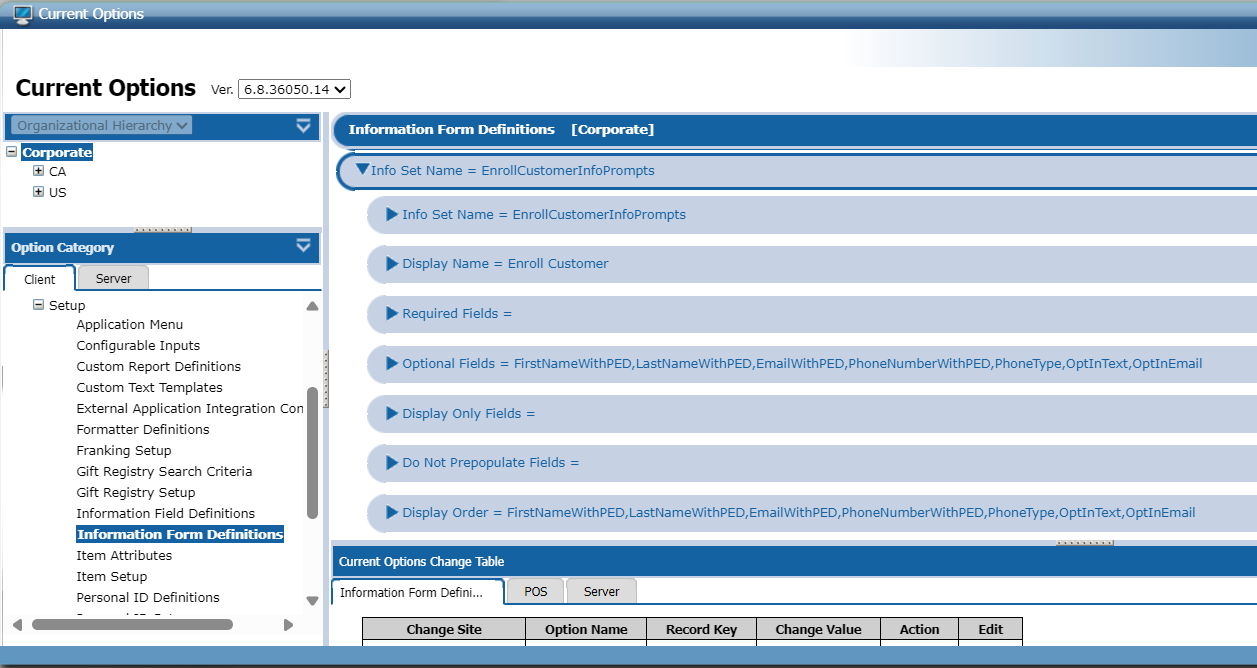
The following table describes the options for the Enroll Customer information form.
| Option name | Purpose | Sample value |
|---|---|---|
| Info Set Name | Specifies the unique name for the information form, between zero to 40 alphanumeric characters. | EnrollCustomerInfoPrompts |
| Display Name | Specifies a user-friendly name that is displayed on the POS application screen. | Enroll Customer |
| Required Fields | Specifies the fields that are required when the associate is entering data on the POS application screen. | PhoneNumber,Email |
| Optional Fields | Specifies the fields that are optional when the associate is entering data on the POS application screen. | FirstName,LastName |
| Display Only Fields | Specifies the fields that should be display-only and are not editable on the POS application screen. | (None) |
| Do Not Prepopulate Fields | Specifies the fields that should not be pre-populated on the POS application screen. | (None) |
| Display Order | Specifies the order in which the fields are displayed on the POS application screen. | FirstName,LastName,PhoneNumber,Email |
| PED Input Mode | Specifies the entry method that should be used when entering data. | POS |
| PED Verification View | When using a PIN pad to enter customer information, specifies the name of the PIN pad screen on which the information set is displayed. | (None) |
| Validator | Specifies the validator used to validate the data entered in each field. | (None) |
| Validator Data | Specifies the validator data to be used when validating the data entered in each field. | (None) |
| Help Text File | Specifies the help text file for the customer information screen on the POS application. | (None) |
| Parsed Input Validator | Validates and enables population of customer information using third-party validation. | (None) |
Configuring the information fields
These are all the information fields, the parameters, and the values that make up the Enroll Customer information form or the customer information screen that is displayed on the POS application.
In the WebOffice EOM application, the information fields used in the Enroll Customer information form can be configured using the following parameter category:
- Setup > Information Field Definitions

Each information field is a record in the Information Field Definitions parameter category. The following table describes the FirstName information field, one of the fields used in the Enroll Customer information form, as an example. Other information fields used by default in the Enroll Customer information form are LastName, PhoneNumber, and Email. For more information, refer to Information Field Definitions.
| Field | Option name | Purpose | Sample value |
|---|---|---|---|
| FirstName | Field ID | Specifies the unique identifier for the field, between zero to 40 alphanumeric characters. | FirstName |
| Internal Store name | Specifies the internal name of the field in which the data is stored on the POS, between zero to 40 alphanumeric characters, as preferred. | FirstName | |
| Display Text | Specifies the name of the field to display on the POS application screen, a user-friendly name between zero to 40 alphanumeric characters. | First Name | |
| Minimum Length | Specifies the minimum length of the data that users can enter into the field. | 0 | |
| Maximum Length | Specifies the maximum length of the data that users can enter into the field. | 27 | |
| Custom Input Type | Specifies the data type of the field. An input type can be a Text, Numeric, AlphaNumeric, and others. | Any | |
| Input Mask | Specifies the masking format for the information entered in the field. | (None) | |
| Custom Input Data | Provides the specific configuration values that are unique to the input type. | (None) | |
| Validator | Specifies the validator used to check if the data entered in the field is valid. | RegexValidator | |
| Validator Data | Specifies the data used for validating the data entered in the field. | Match=^((?! and ).)*$ | |
| Is Masked | Determines whether or not to mask the information entered in the field. | No | |
| Linked Field to PED Data Field | Specifies the linked variable data field defined for the PIN pad device. | FirstName | |
| Is PED Only | Determines whether or not the POS application allows entering data in the field using a PIN pad device only. | No | |
| PED Input Field | Specifies the name of the PIN pad screen on which the customer information screen is displayed. | (None) | |
| Entry Method | Determines what the POS application accepts as the entry method for the field, such as key-in entry, scan entry, swipe entry, or scan and swipe entry. | 0 | |
| Alternate ID | Specifies the alternate ID accepted for the information field. Options for an alternate ID are the following.
| 3 |