Accepting cash
Use the Cash tender to pay for a sales transaction using cash.
Configurable features
The POS application can be configured with the following feature.
- Print the voided cash or foreign currency tender information on the sales, return, or exchange receipt. This feature applies to single partial tender and mid-void transactions. Refer to the following option:
- Receipt Printing > Print Voided Currency Tenders On Receipt
To accept cash payments, follow these steps:
- On the Tender Menu screen, select Cash. The application displays the Cash screen, with a list of suggested amounts on the options buttons.
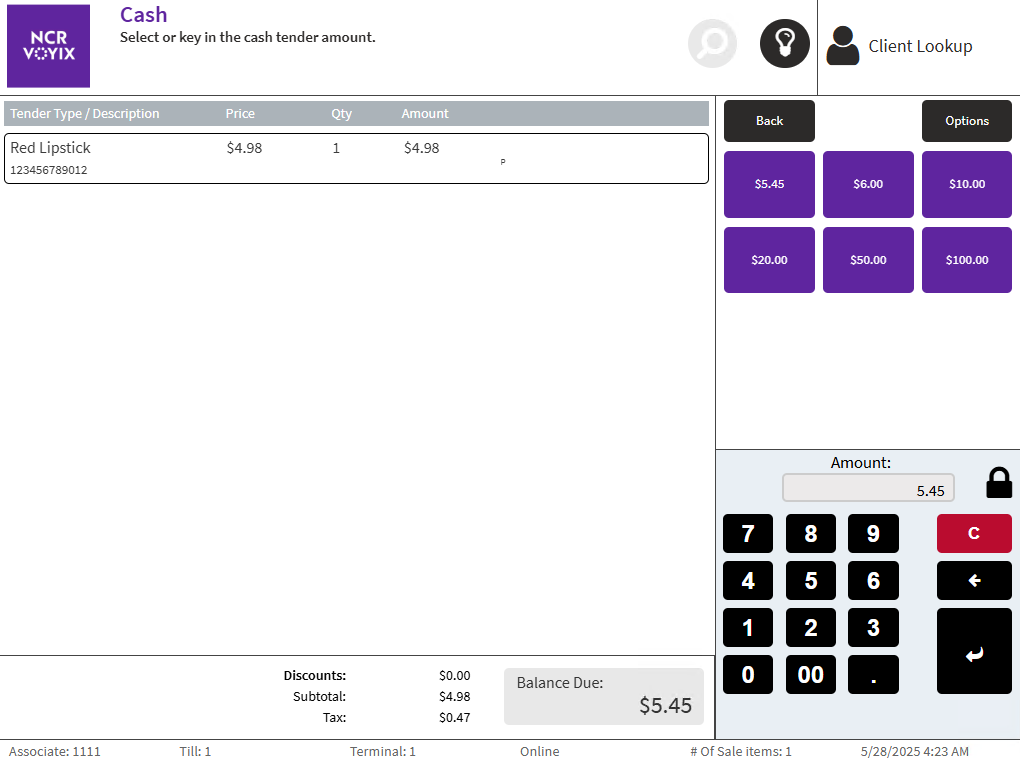
- Select a button corresponding to the amount that matches the amount that the customer offers. Alternatively, enter an amount on the keypad, and then select Enter.
The application prints the receipt and displays the Change Due screen.
- Close the cash drawer. The application displays the Sale Main Menu or the Transaction Types screen.