Configuring SAIL for Appriss Integration
If a retailer uses Advanced Store features that integrate with Appriss Retailer components, the SAIL Integration Layer should be configured to recognize the Authentication Key. Appriss provides a valid authentication key to each retailer.
Note
This configuration should take place on the Web Server, where SAIL is installed. If SAIL is installed on a standalone server, configure the web.config file located on the SAIL server.
This task uses the following file.
| File name | Location |
|---|---|
SAIL.Config.exe | C:\inetpub\wwwroot\SAIL\SAIL.Config |
To configure SAIL for Appriss, follow these steps:
- On the Web server, navigate to the following folder:
C:\inetpub\wwwroot\SAIL\SAIL.Config
- Run the SAIL Configuration tool by double-clicking the SAIL.Config file.Note
The user must be logged in as an Administrator to run this tool.
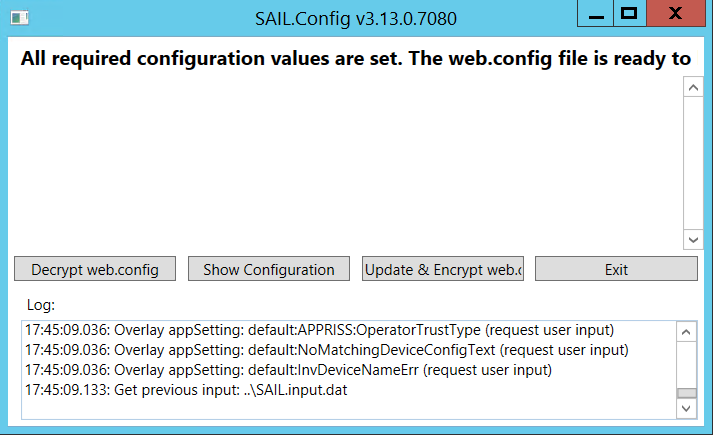
- Select Decrypt web.config.
- Select Show Configuration.
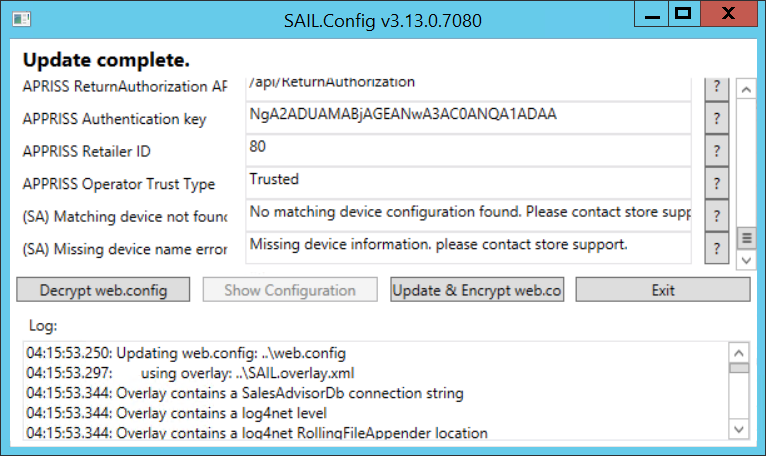
- Enter the APPRISS Authentication key provided by Appriss.
- Enter the APPRISS Retailer ID provided by Appriss.
- Select Update & Encrypt web.config.
- Select Exit.