Main Window
This section describes the main window of the NCR Configuration Utility.
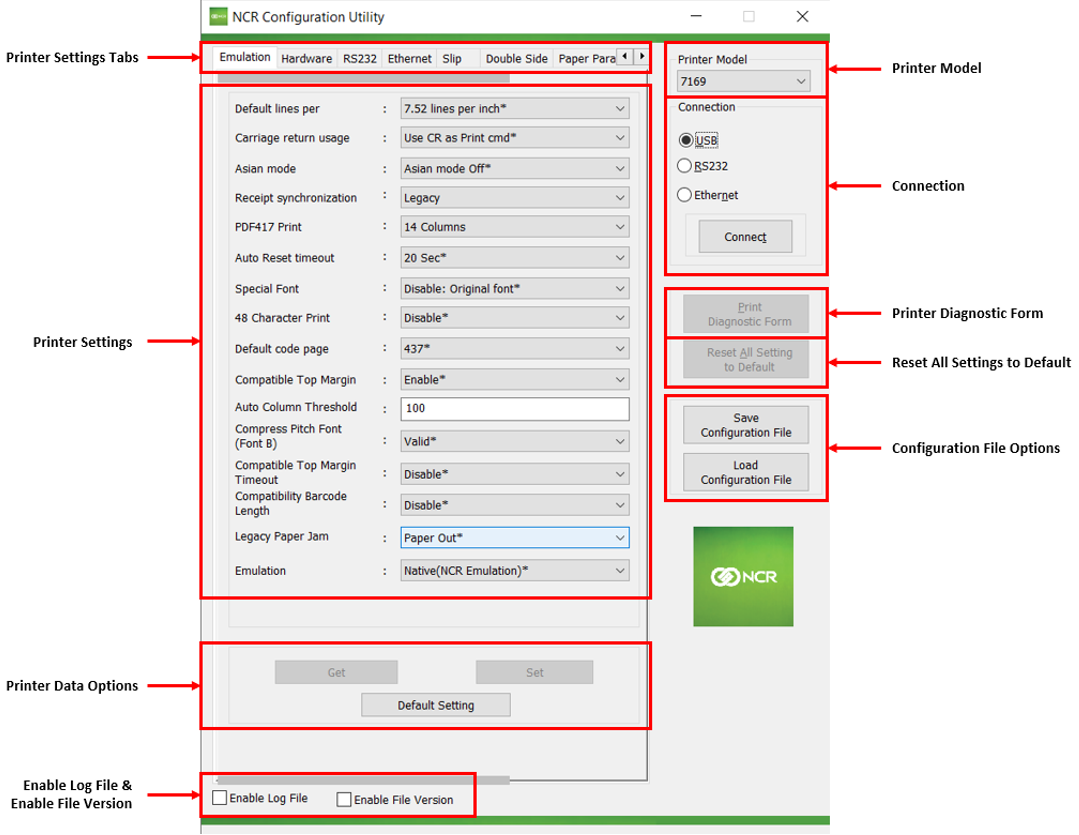
| Item | Description |
|---|---|
| Printer Settings Tab | Displays tabs that contain different sets of parameters to modify. |
| Printer Settings | Displays settings that can be modified and applied to the printer. Note
Some parameters are disabled if the NCR 7199 Series printer is connected. |
| Printer Data Options | Provides options to do the following tasks:
|
| Enable Log File and Enable File Version | Provides the following options:
|
| Printer Model | Selects the printer model. |
| Connection | Connects the printer to the terminal using any of the following interfaces:
For more information, refer to Connecting the printer to the terminal. |
| Print Diagnostic Form | Prints the diagnostic form. For more information , refer to Printing a Diagnostic Form. |
| Reset All Setting to Default | Resets all printer settings to default. For more information, refer to Resetting All Printer Settings to Default. Note
Defaults settings are marked with an asterisk (*). |
| Configuration File Options | Provides options to do the following tasks:
|